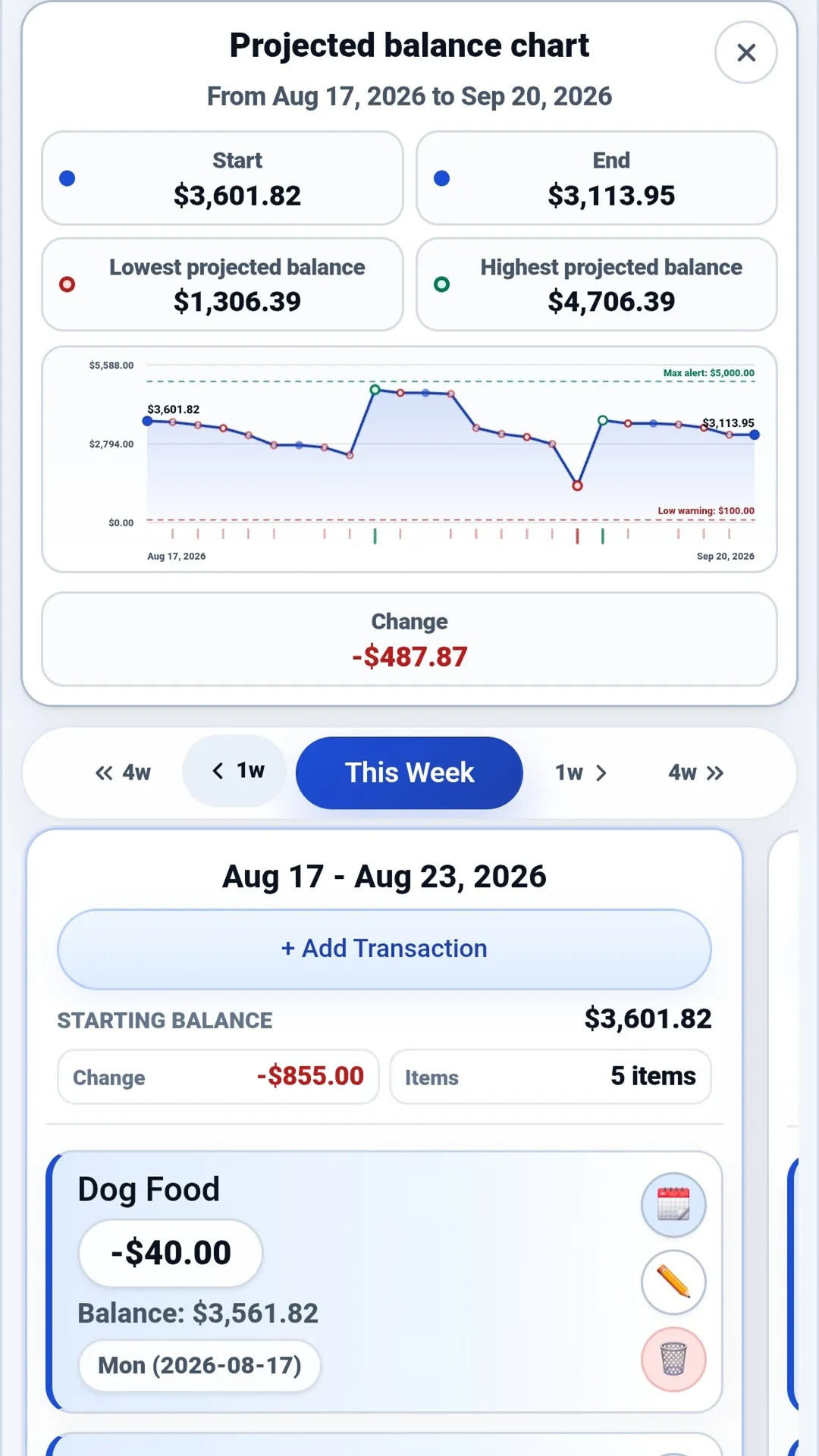
A monthly plan can work on paper and still leave one week feeling uncomfortably tight.
The reason is often timing. A paycheck may arrive on Friday, while rent, utilities, a card payment, and a savings transfer are all scheduled earlier in the week. The totals may fit the month, but the order still matters.
A payday cash-flow calendar helps you see that order. It places expected income and outgoing activity on a timeline, then follows how each item may change the balance. You are not trying to predict every dollar perfectly. You are giving yourself an earlier look at what your money needs to accomplish next.
What is a payday cash-flow calendar?
A payday cash-flow calendar is a forward-looking list of expected money movement organized by date.
It can include:
- Paychecks and other expected income
- Rent or mortgage payments
- Utilities, insurance, subscriptions, and other bills
- Credit-card and loan payments
- Transfers between accounts
- Planned savings contributions
- Flexible expenses you expect before the next payday
Unlike a monthly total, the calendar preserves the sequence. That makes it easier to see whether several commitments are expected to hit before the income meant to cover them.
If you want a deeper comparison of the two approaches, read Cash-Flow Forecasting vs Budgeting: What’s the Difference?.
Build your calendar in five steps
You can start with a sheet of paper, a calendar, or a forecasting tool. The method matters more than the format.
1. Record the starting balance
Choose the account you want to review and write down its current balance. Starting with one account keeps the first pass manageable.
Be clear about what the number represents. Pending transactions or holds may not yet appear in the balance you see, so review those separately when they matter.
2. Add each expected payday
Place your expected income on the date it is normally available to spend. If the amount varies, use a reasonable estimate and update it when you know more.
Avoid relying on money before it is expected to arrive. The purpose of the calendar is to make timing visible, so the income date is just as important as the amount.
3. Add committed bills, payments, and transfers
Next, add the activity that already has a job:
- Bills with known due dates
- Automatic payments
- Card or loan payments
- Transfers to savings or another account
- Recurring expenses that are likely to occur
Use the date you expect the money to leave the account, not simply the date shown on a monthly budget. If an amount changes from month to month, begin with your best current estimate and revise it later.
4. Add expected flexible activity
The calendar will be more useful if it includes the everyday spending that happens between paydays. That might include groceries, fuel, transportation, or another expense you can reasonably anticipate.
You do not need to predict every purchase. A practical estimate is enough to make the forecast more realistic than a list containing only fixed bills.
5. Review the lowest point before the next payday
Now follow the balance after each item. The most important number may not be the balance at the end of the month. It may be the lowest projected balance between today and the next deposit.
That low point can help you ask better questions:
- Is every date and amount correct?
- Is a transfer scheduled earlier than it needs to be?
- Is an optional purchase creating pressure in an already busy week?
- Does the plan leave the cushion you intended?
- Is there an expense missing from the calendar?
The forecast is a planning view, not a guarantee. Actual balances can differ because transactions change, clear at unexpected times, or were not included.
A simple payday example
Suppose a checking account begins with $1,500 and the next two weeks look like this:
| Date | Expected activity | Amount | Projected balance |
|---|---|---|---|
| Monday | Starting balance | $1,500 | |
| Tuesday | Rent | -$1,050 | $450 |
| Wednesday | Utilities | -$180 | $270 |
| Friday | Paycheck | +$1,800 | $2,070 |
| Saturday | Groceries and fuel | -$220 | $1,850 |
| Monday | Credit-card payment | -$500 | $1,350 |
The ending balance is not the whole story. Before Friday’s paycheck, the projected balance falls to $270. That is the point worth reviewing.
The calendar does not decide what to do. It shows the timing clearly enough for you to check the plan while there may still be time to respond.
What to review when a week looks tight
Start by checking the information rather than assuming the worst.
Confirm the current balance, pending activity, dates, and amounts. Look for an annual renewal, irregular bill, or transfer that may have been left out. If the forecast is accurate, distinguish committed items from choices that still have flexibility.
Sometimes the answer is simply awareness: the lower balance is expected and still within the cushion you chose. Other times, the calendar reveals a timing decision you want to revisit. What is appropriate depends on your own circumstances and the rules of the accounts or providers involved.
How CashEnzo supports this habit
CashEnzo is built around cash-flow forecasting. Add paydays, bills, transfers, card and loan payments, savings goals, and recurring activity to see how an account balance may change over the coming weeks.
You can start manually with one account and only the activity that matters next. If you want more history, CashEnzo also supports CSV, QFX, and OFX statement imports. Imported activity begins as a reviewable draft, including category suggestions and duplicate checks, before you save it.
CashEnzo does not connect to your bank or ask for your bank password. Forecast alerts can also help call attention to a projected balance that crosses the low or high threshold you set.
For another way to connect the monthly plan with the timeline, read How to Connect Monthly Budget Goals to a Cash-Flow Forecast.
A 10-minute weekly routine
When your recorded transactions are up to date, CashEnzo should already show the correct starting balance for the week. A short review is mainly about confirming what actually happened and keeping what comes next current:
- Mark completed transactions as cleared and confirm their actual amounts.
- Correct any recorded activity that changed or did not occur as expected.
- Confirm the next payday and its expected amount.
- Review bills, payments, and transfers through the following payday.
- Inspect the lowest projected balance and the activity around it.
The goal is not a flawless forecast. It is a current enough view to support the next decision.
Check the timing with your own estimates
CashEnzo’s free Payday Timing Checkup puts the dates and amounts you enter in order, shows the lowest projected balance, and separates a temporary gap from a period that ends below zero. It runs in your browser without an account or bank connection, and CashEnzo does not receive the financial details you enter.
See what your money needs next
Explore CashEnzo on the web, or learn more in What is CashEnzo?. CashEnzo is also available on Android through Google Play and on Windows through the Microsoft Store.
Eligible new subscribers can try CashEnzo free for one month. A subscription and card are required on the web; terms apply.


This article is for general educational purposes and is not financial, tax, legal, or accounting advice. Cash-flow forecasts are estimates and may differ from actual account activity.